1
Write in Markdown
Use a plain-text resume source that stays easy to edit, review, version, and reuse.
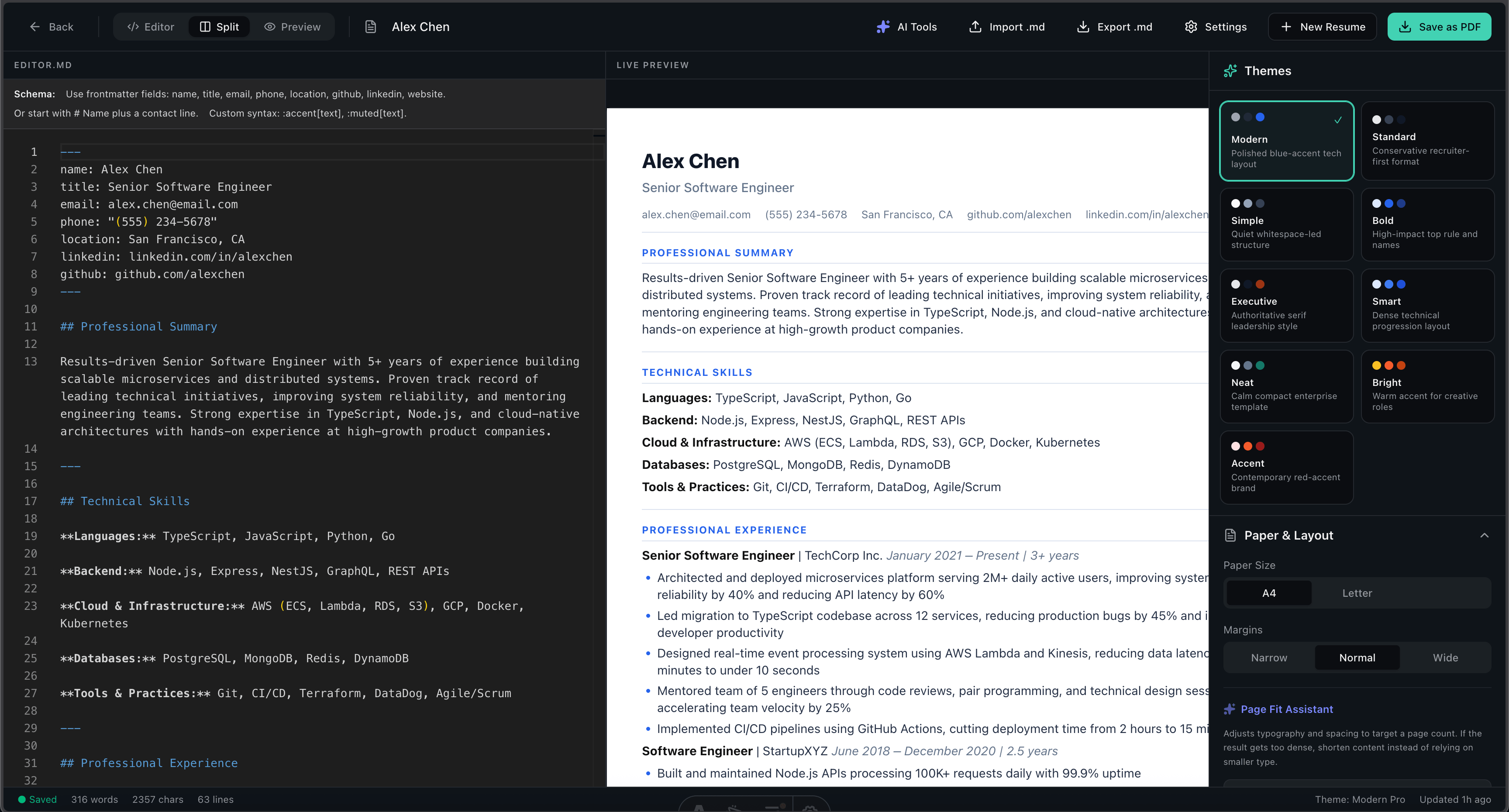
Write in Markdown, choose a clean theme, export a polished PDF, and use optional BYOK AI resume checks when you want a second pass on keywords or bullet clarity.
No design skills required. No account needed. Just your words.
Use a plain-text resume source that stays easy to edit, review, version, and reuse.
Pick a professional layout and tune spacing, type, margins, and dividers in the live preview.
Export a clean, selectable-text PDF that matches the preview and is ready to send.
Everything you need, nothing you do not.
A focused Markdown editor with live preview, import/export controls, and no document formatting side quests.
Single-column layouts, readable section names, and selectable text help your resume stay easy to parse.
Use your own provider key for bullet rewrites, job keyword checks, and cover-letter drafts when you need them.
Every template is customizable while your Markdown content stays portable.
Senior Software Engineer with 7+ years of experience building platform services, developer tools, and reliable product infrastructure for B2B SaaS teams. Strong record of reducing latency, improving deployment quality, and translating ambiguous product requirements into maintainable systems used by revenue, support, and customer success teams.
Languages: TypeScript, JavaScript, Go, Python
Frontend: React, Astro, Next.js, design systems, accessibility
Backend: Node.js, GraphQL, REST, PostgreSQL, Redis, event-driven services
Practices: CI/CD, observability, API design, incident reviews, technical planning, mentoring
• Led a customer onboarding rewrite that reduced activation time by 42% and increased trial-to-paid conversion by 18%.
• Designed CI quality gates for accessibility, performance, and regression testing across 12 frontend packages.
• Built a GraphQL aggregation layer that removed duplicate client-side data fetching and reduced dashboard load time by 37%.
• Partnered with product managers to break down a 6-month platform roadmap into weekly release milestones with clear risk owners.
• Mentored five engineers through architecture reviews, pairing sessions, and production readiness checklists.
• Led post-incident reviews for authentication and billing issues, creating runbooks that reduced repeat incidents by 40%.
Backend Platform Engineer with 8 years of experience designing APIs, queues, and database-backed systems for high-volume workflow products. Focused on reliability, observability, data integrity, and predictable service ownership across distributed systems.
Languages: Go, TypeScript, Python, SQL
Backend: PostgreSQL, Redis, Kafka, GraphQL, REST, Node.js, workers, webhooks
Infrastructure: AWS, Docker, Kubernetes, Terraform, Datadog, OpenTelemetry
Practices: Domain modeling, incident response, schema design, load testing, service migrations
• Split a monolithic billing service into 6 bounded services, reducing failed renewals by 27%.
• Introduced idempotent job processing for payment workflows handling 18M monthly events.
• Cut p95 API latency from 840ms to 290ms by redesigning query paths and cache invalidation.
• Designed a webhook delivery pipeline with retries, signatures, and replay tooling for 1,200 enterprise integrations.
• Created database migration playbooks that let teams ship schema changes with zero planned downtime.
• Added service-level objectives for billing, entitlement, and notification systems with weekly reliability reviews.
Junior Software Engineer with internship and project experience building React interfaces, Node.js APIs, and tested full-stack features. Comfortable learning quickly, documenting tradeoffs, asking clear questions, and shipping maintainable code with review feedback.
Languages: JavaScript, TypeScript, Python, SQL
Frameworks: React, Node.js, Express, Astro, Tailwind CSS
Tools: Git, GitHub Actions, PostgreSQL, Vitest, Playwright, Vercel
Concepts: REST APIs, authentication, relational data modeling, accessibility basics, debugging
• Built an internal support dashboard that reduced manual customer lookup time by 40%.
• Added unit tests for API validation paths, increasing coverage from 62% to 81%.
• Documented setup steps and common debugging workflows for future interns.
• Implemented role-based filters for support agents using React state, URL params, and reusable query helpers.
• Fixed 14 accessibility issues across forms, including missing labels, focus order, and error messaging.
• Paired with a senior engineer to profile slow API responses and add indexes for common lookup paths.
Senior Frontend Engineer with 6+ years of experience building accessible product surfaces, design systems, and performance-focused React applications for B2B SaaS teams. Combines strong UI engineering with product judgment, design partnership, and a practical approach to shipping reliable interfaces.
Core: TypeScript, React, Next.js, Astro, HTML, CSS, browser APIs
Product UI: Design systems, accessibility, complex forms, dashboards, data visualization
Quality: Vitest, Playwright, Storybook, Lighthouse, visual regression, CI review gates
Collaboration: Design pairing, technical discovery, release planning, documentation
• Rebuilt the account setup flow in React, improving completion by 31% and reducing support tickets by 22%.
• Created reusable form, table, and navigation primitives adopted by 9 product squads.
• Reduced route-level JavaScript by 38% through bundle analysis, lazy loading, and server-rendered defaults.
• Led accessibility improvements for keyboard navigation, focus states, and form errors across the admin workspace.
• Partnered with design to define interaction patterns for filters, bulk actions, and empty states used across 40+ screens.
• Added Playwright coverage for high-risk billing and permissions flows, reducing UI regression escapes by 30%.
Engineering Manager with 10 years across software delivery and people leadership. Builds clear planning systems, improves team execution, and keeps technical quality visible without slowing product momentum. Experienced in coaching senior engineers, hiring balanced teams, and leading reliability improvements across product platforms.
People: Hiring, coaching, performance feedback, career growth
Delivery: Roadmaps, estimation, incident review, dependency management, operating rhythms
Technical: Platform architecture, reliability, frontend systems, API design, migration planning
Business Partnership: Product planning, executive updates, customer escalation support, budgeting
• Led a 9-person platform team that delivered 96% of quarterly commitments across 3 product lines.
• Reworked planning rituals, reducing carryover work by 28% and improving cross-team visibility.
• Sponsored reliability investments that reduced customer-facing incidents from 11 to 4 per quarter.
• Hired 4 engineers and redesigned onboarding, reducing average ramp time from 10 weeks to 6 weeks.
• Coached two senior engineers into technical lead roles with explicit growth plans and architecture ownership.
• Partnered with product leadership to sequence a permissions migration without delaying customer-facing roadmap work.
• Introduced monthly quality reviews covering incidents, flaky tests, accessibility, performance, and maintainability.
Backend Platform Engineer with 8 years of experience designing APIs, queues, and database-backed systems for high-volume workflow products. Focused on reliability, observability, data integrity, and predictable service ownership across distributed systems.
Languages: Go, TypeScript, Python, SQL
Backend: PostgreSQL, Redis, Kafka, GraphQL, REST, Node.js, workers, webhooks
Infrastructure: AWS, Docker, Kubernetes, Terraform, Datadog, OpenTelemetry
Practices: Domain modeling, incident response, schema design, load testing, service migrations
• Split a monolithic billing service into 6 bounded services, reducing failed renewals by 27%.
• Introduced idempotent job processing for payment workflows handling 18M monthly events.
• Cut p95 API latency from 840ms to 290ms by redesigning query paths and cache invalidation.
• Designed a webhook delivery pipeline with retries, signatures, and replay tooling for 1,200 enterprise integrations.
• Created database migration playbooks that let teams ship schema changes with zero planned downtime.
• Added service-level objectives for billing, entitlement, and notification systems with weekly reliability reviews.
Start from role-specific samples with measurable, recruiter-readable bullets.
Short guides on structure, keywords, examples, and applying with confidence.
A complete software engineer resume guide for ATS-friendly structure, honest keyword matching, job-description tailoring, and recruiter readability.
Read More ->A practical guide to writing software engineer resume bullet points with action, technical context, scope, metrics, and credible impact.
Read More ->Quick answers before you open the editor.
Yes. MDResume is open source, runs in your browser, and does not require an account to write or export a resume.
The templates use clean single-column structures, standard section names, and selectable text exports to keep parsing straightforward.
You can bring your own provider key and use AI for bullet rewrites, job keyword checks, and cover-letter drafts. Keys stay in your browser.
Yes. Your resume source remains Markdown with frontmatter for contact details, so it is portable, diffable, and easy to edit.
No. Write the content, choose a theme, adjust typography if needed, and export a PDF when the preview looks right.
Yes. The public pages are Astro and the editor runs as a client-side app, so it can be hosted on common static platforms.